Quick Summary
The End of “Prompting and Praying” For the […]
The End of “Prompting and Praying” • The Mechanics: Why Timing Changes Everything • The Physics of Time: Acceleration, Deceleration, and Motion Logic
The End of “Prompting and Praying”
For the first two years of generative video, creators faced the same frustrating loop: write a detailed scene description, hit generate, and hope the AI interpreted the timing correctly. Most of the time, it did not. Actions would bleed into each other. Transitions would land a half-second too early or too late. The result looked like a dream sequence — atmospheric but narratively incoherent.
Timestamp prompting ends that cycle. By anchoring specific instructions to exact moments on the timeline, creators move from improvisational chaos to directorial intent. The model stops guessing what happens next and starts following a script.
How timestamp prompting helps video creators: it provides a precise, time-based framework for AI video generation, enabling granular control over motion, lighting shifts, and multi-shot transitions at specific second marks for frame-accurate, edit-ready results.
The Mechanics: Why Timing Changes Everything
In professional video production, a transition that is even half a second off can destroy the rhythm of a scene. A product reveal that lands two frames late loses its punch. A lighting shift that arrives too early spoils the mood.
Timestamp prompting addresses this by giving the AI a temporal roadmap. Instead of describing an entire scene in one paragraph, you segment it into time blocks:
[0-3s] Silhouette reveal under cold blue backlight
[3-6s] Side-light sweep revealing product details
[6-8s] Close-up focus on headphone logo with warm glow
Each block is a self-contained instruction. The AI executes them in sequence rather than trying to mash every visual element into every frame simultaneously.
![Split screen: Left side shows a messy cloud of text labeled 'Standard Prompt'; Right side shows a clean, linear timeline with blocks [0-2s], [2-5s] labeled 'Timestamp Prompt'.](https://imgcdn.geowriter.ai/public/images/2026/03/img_1772584764452_746967.png?token=ea429b40a30b1741ecf07514db0496da&expires=1804120764)
As Dicloak notes in their 2026 analysis, these frameworks allow for multi-shot sequences with cinematic pacing, turning a hit-or-miss generative process into a reliable production tool.
The Physics of Time: Acceleration, Deceleration, and Motion Logic
Effective timestamp prompting is not just about telling the AI what to show — it is about telling it how movement should feel. By segmenting prompts intelligently, you can command acceleration and deceleration that mirrors real cinematography.
Consider this pattern:
| Time Block | Camera Instruction | Motion Quality |
|---|---|---|
| [0-2s] | Rapid push toward subject | Accelerating, building tension |
| [2-4s] | Hold position | Static, letting the viewer absorb |
| [6-8s] | Slow settle to wide shot | Decelerating, releasing tension |
This creates a dynamic range that looks like it was shot by a cinematographer, not generated by a neural network. Data from Wyzowl shows that 73% of consumers prefer short-form videos under 2 minutes — timestamp prompting helps you maximize every second of that limited window.
You can also evolve lighting profiles across timestamps — shifting from a cold morning blue to a warm sunset glow — to convey the passage of time within a single shot. By defining these motion components at specific intervals, the AI keeps the subject consistent while handling complex physical interactions. This “physics-aware” prompting applies force and resistance to objects at specific moments, making movement feel heavy and real rather than floaty.
![A flow diagram: [AI Prompt Timestamps] -> [NLE Timeline Markers] -> [YouTube Chapters] -> [Google Search Result Snippets].](https://imgcdn.geowriter.ai/public/images/2026/03/img_1772584732140_670480.png?token=816f81ddabcd91f5d50cf851341da27c&expires=1804120732)
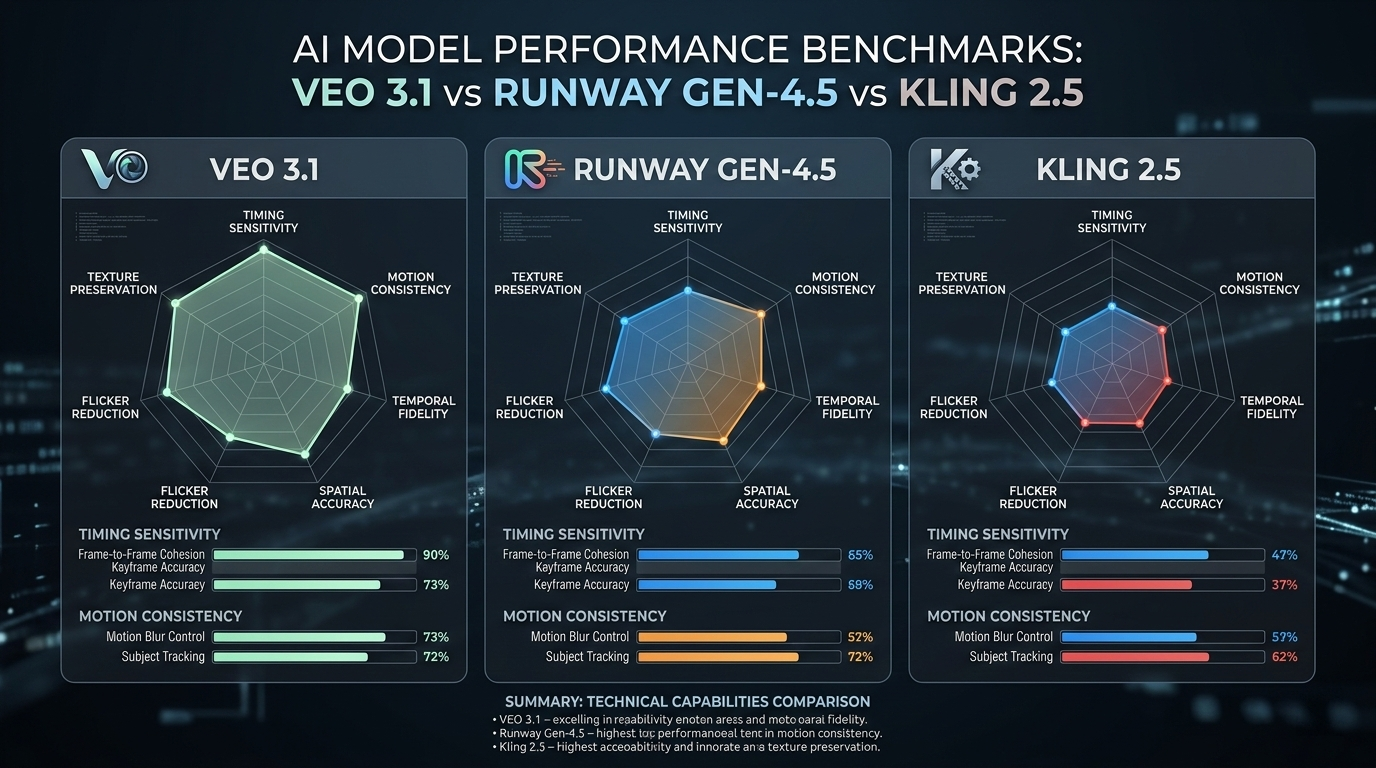
The Model Landscape: Veo 3.1 vs Runway Gen-4.5 vs Kling 2.5
Choosing the right model is the first decision in any timestamp-driven workflow. Here is how the current leaders compare:
| Model | Primary Strength | Timing Sensitivity | Best For |
|---|---|---|---|
| Google Veo 3.1 | Native timestamp framework; cinematic logic | 0.5s intervals | Narrative sequences |
| Runway Gen-4.5 | Advanced motion brush and temporal markers | 1.0s intervals | Artistic/experimental |
| Kling 2.5 Turbo | Segmented action prompts for high-motion | 1.0s intervals | Fast-paced product demos |
In a 2026 Veo 3.1 product demo, Google showcased an 8-second headphone choreography using timestamp blocks: 0-3s silhouette reveal, 3-6s side-light sweep, 6-8s close-up focus. The result proved that Veo 3.1 follows a chronological progression rather than compressing all instructions into a single messy frame.
Runway Gen-4.5 and Gen-3 Alpha also handle sequencing well, especially when paired with “Director-level” tools like seed-based consistency for maintaining visual identity across shots.
The Full-Cycle Workflow: From Prompt to YouTube SEO
The benefits of timestamp prompting extend beyond video production into distribution. The time blocks you define during AI generation can cascade directly into your content strategy.
The pipeline works like this:
- Write timestamp prompts during AI generation (e.g.,
[0-3s],[3-6s],[6-8s]) - Map timestamps to NLE timeline markers in your editing software
- Convert markers to YouTube chapters with descriptive labels
- YouTube chapters become “Key Moments” that Google Search can highlight directly in results
According to Cisco and Wyzowl, video content will account for 82% of all internet traffic by the end of 2026. When someone searches for a specific step in a tutorial, Google can drop them directly at the timestamp you originally directed with AI — leading to better click-through rates and longer watch times.
Advanced Tactics: Negative Timestamps and Seedance Animation
Negative Timestamps
Advanced creators now use negative prompting for specific time windows to suppress artifacts before they appear. For example:
[4-6s] NO flickering, NO color distortion, NO lens flare
This tells the AI what to avoid during complex transitions, keeping the visual quality clean without sacrificing the actions in adjacent time blocks.
Seedance 1.0 Pro
Seedance 1.0 Pro specializes in animating still images based on audio timing. By pairing it with timestamp markers, you can sync the movement of a still image to specific beats of a voiceover. The result eliminates the “floaty” AI aesthetic — every movement has a clear, timed reason for happening, rooted in the audio cadence.
FAQ
What is the difference between standard prompting and timestamp prompting?
Standard prompting describes the entire scene in one block, causing the AI to attempt everything simultaneously. Timestamp prompting anchors specific actions to exact seconds (e.g., [0-2s] zoom, [2-4s] pan). It provides “Director-level” control over the sequence and pacing of every shot.
Which AI video models are best for frame-accurate timestamp control?
Google Veo 3.1 is the current gold standard for native timestamping, with 0.5-second sensitivity. Runway Gen-4.5 and Kling 2.5 Turbo also perform well for segmented actions. Newer 2026 models like Sora 2 Pro are catching up fast, offering high accuracy for complex multi-scene storytelling.
How many timestamps should a single AI video prompt include?
For a 10-second clip, use 3-5 major time blocks to avoid overwhelming the model. Avoid overlapping actions in the same sub-second window, and leave 1-2 second “buffer” zones between major transitions to maintain visual consistency.
Conclusion
Timestamp prompting is the bridge between generative AI and real cinematography. It lets you dictate when an action happens just as clearly as what happens — turning an unpredictable black box into a reliable production tool.
To get started, break your next 8-second hero shot into three blocks: [0-3s], [3-6s], and [6-8s] using Veo 3.1. The difference in responsiveness is immediately apparent when the AI is working on your schedule rather than its own.