Quick Summary
The Prompt That Knew Exactly When to Cut In early 2026, […]
The Prompt That Knew Exactly When to Cut • Standard Prompts: The Black Box Approach • Timestamp Prompts: Timeline Thinking for AI
The Prompt That Knew Exactly When to Cut
In early 2026, the audio platform Pocket FM integrated time-anchored AI prompts into their video production pipeline. The result: a 30-40% increase in user retention. The AI did not get smarter. The prompts got more precise. Instead of asking for “a video about a city at night,” the team started giving instructions like “00:00-00:04: Dolly shot zooming into the protagonist’s eyes; 00:05-00:08: Streetlights flicker on one by one.” Same model. Dramatically different output.
This is the core distinction between standard prompts and timestamp prompts — and it is reshaping how creators, developers, and AI systems communicate about time.
Standard Prompts: The Black Box Approach
A standard prompt treats the entire output as a single block. You describe what you want in broad terms, and the AI interprets the whole thing at once.
Example: “Create a video of a busy city street transitioning from day to night.”
The model decides the pacing, the transitions, and the timing. You get a result, but you have zero control over when specific events happen within the sequence. The output often suffers from:
- Pacing that does not match a professional editor’s intent
- “Hallucinated” transitions that feel random
- No frame-accurate alignment with music beats or dialogue
- Iteration requires re-prompting the entire sequence
Standard prompts work for brainstorming and exploration. They break down when precision matters.
Timestamp Prompts: Timeline Thinking for AI
Timestamp prompts introduce chronological anchors into the instruction itself. Each directive is tied to a specific time bracket, giving the AI surgical control over what happens, and when.
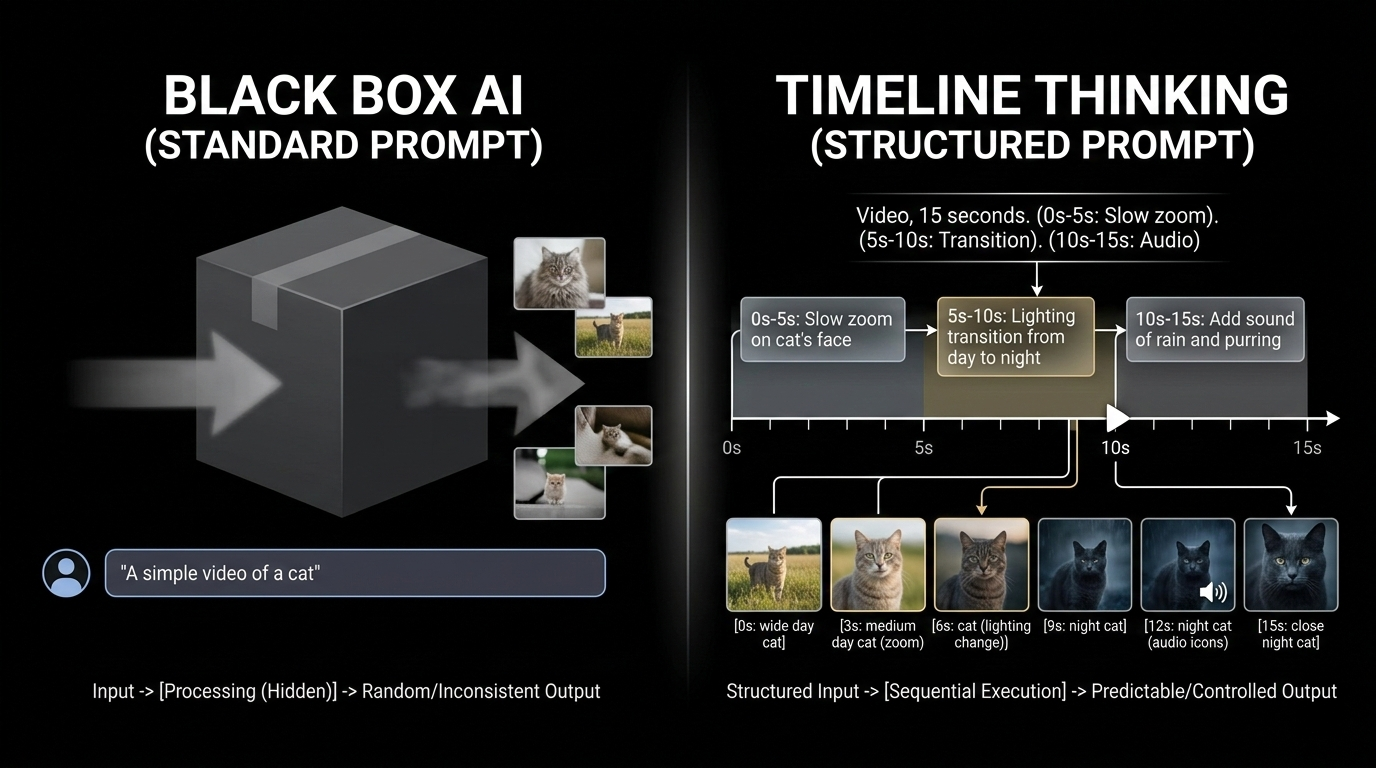
The structured formula: [Timestamp] + [Cinematography Cue] + [Subject] + [Action]
Example: [00:00-00:04] Dolly shot, zooming in on the protagonist's eyes.
This approach brings what filmmaker and industry writer Josh Edwards calls “Timeline Thinking” into the AI prompt box. It mirrors the traditional video editing workflow — where cuts and transitions are tied to specific frames — and translates it into language the model can execute precisely.
| Feature | Standard Prompt | Timestamp Prompt |
|---|---|---|
| Timing control | None — AI decides | Frame-accurate time brackets |
| Iteration speed | Re-prompt entire output | Adjust specific segments only |
| Narrative flow | Random pacing | Intentional sequencing |
| Professional readiness | Needs manual editing | Ready for post-production |
| Audio sync | No alignment | Precise event-to-beat matching |
The AI Models Leading the Timestamp Revolution
Veo 3.1: The Cinematic Controller
Currently, Veo 3.1 is the industry leader for granular, time-based control. Unlike earlier models that struggle with long-form consistency, Veo 3.1 natively supports segmenting actions within a single request. You can layer complex instructions — camera movements, lighting shifts, dialogue — across different time brackets, and the model maintains continuity between them.
According to Google Cloud, Pocket FM achieved lifelike lip-sync and professional-grade promotional content by combining timestamped instructions with Cinematography Cues — directional commands that specify camera behavior within each time segment.
Kling 2.5 Turbo: Rapid Segmented Action
While Veo 3.1 handles cinematic depth, Kling 2.5 Turbo excels at high-speed, action-heavy segments. It works well for short, intense bursts of motion — car chases, fight sequences, sports highlights — within a larger time-anchored sequence. It enables “Rapid Segmented Action” where the AI focuses on fast movement without losing the broader project context.
Sora 2 Pro: Motion Continuity
A persistent challenge in AI video is “motion continuity” — ensuring a character’s movement looks natural across segmented instructions. Sora 2 Pro uses timestamps to plan motion trajectories: if a character starts walking at 00:02, the model calculates their position at 00:06 to maintain spatial consistency. For security and provenance, SynthID digital watermarking verifies content authenticity and confirms timing has not been tampered with — critical for professional licensing workflows.
Beyond Video: Time-Awareness as a Universal AI Anchor
The logic of timestamping extends far beyond creative media. Chronological data provides the context AI needs to understand “sequence” in any domain.
ISO Date Format and AI Scheduling
When prompts include standardized dates (ISO 8601: YYYY-MM-DD), AI models interpret relative terms like “tomorrow,” “next Friday,” or “last week” with dramatically higher accuracy. Specifying the current date in the system prompt eliminates ambiguity and reduces scheduling errors in bots and assistants.
Execution Logs: Timestamps as Source of Truth
In software systems, the timestamp is the ultimate audit trail. It tells humans and AI what happened, when it happened, and how long a process took. Log analysis, incident debugging, and performance monitoring all depend on precise chronological markers.
How to Add Timestamps to Your Terminal Prompt
For developers, “prompting” often means the command line. Adding a timestamp to your Bash or Zsh prompt improves workflow visibility, making it easy to trace when commands executed — especially during long scripts or overnight runs.
Discussions on terminal timestamps have accumulated over 160,000 views on Ask Ubuntu, reflecting strong demand for time-aware environments.
Bash setup:
- Open your config:
nano ~/.bashrc - Modify the PS1 line:
export PS1="\t [\u@\h \W]\\$ " - Apply changes:
source ~/.bashrc
Zsh alternative: Use %D{%L:%M:%S} in your prompt variable.
![A comparison of two terminal windows: one with just '$' prompts, and another showing '[14:30:05] user@host ~ $' to highlight time tracking.](https://imgcdn.geowriter.ai/public/images/2026/03/img_1772587496324_624367.png?token=33c6d7be924b0953f3a42b89d1061ef4&expires=1804123496)
The \t flag displays 24-hour time (HH:MM:SS) at the start of every prompt. Your terminal becomes a chronological log without installing any additional tools.
The Deeper Pattern: Time as a Control Surface
What timestamp prompts reveal is a broader principle: time is a control surface for AI. When you anchor instructions to specific moments, you move from describing what you want to specifying when and how it should happen. That shift transforms AI from a suggestion engine into a precision instrument.
This principle applies whether you are generating a 10-second video clip, reviewing a server log, or scheduling a meeting. Chronological context makes AI output more predictable, more useful, and more trustworthy.
FAQ
Which AI video models are best for timestamp prompting?
Veo 3.1 leads for cinematic, frame-accurate control with Cinematography Cues. Kling 2.5 Turbo excels at high-efficiency action segments. Sora 2 Pro is strongest at maintaining motion continuity across complex, multi-timestamped instructions. Each model serves a different production need.
How do I add a timestamp to my Linux terminal prompt?
Edit ~/.bashrc (Bash) or ~/.zshrc (Zsh). In Bash, add \t or \D{%H:%M:%S} to your PS1 variable. Save and run source ~/.bashrc to apply. The timestamp will appear before each command prompt.
Can timestamp prompting be used for audio and transcripts?
Yes. Models like Lyria 3 use timestamps for precision audio syncing — essential for automated lip-syncing and background score alignment. Timestamped transcripts enable AI to perform non-linear editing on podcasts and interviews, allowing users to delete or move audio segments by editing text at specific time coordinates.
What is the difference between a standard prompt and a timestamp prompt?
A standard prompt provides a single, holistic description of the desired output. A timestamp prompt breaks the output into time-anchored segments, each with its own specific instruction. Timestamp prompts offer frame-accurate control, faster iteration, and professional-grade output that standard prompts cannot match.