Quick Summary
A Word That Changed Computing — Literally Sometime in t […]
A Word That Changed Computing — Literally • One Word or Two? The Linguistic Split • How Digital Metadata Tracks File History
A Word That Changed Computing — Literally
Sometime in the early 1970s, a Unix engineer typed timestamp into source code as a single word. Half a century later, that spelling decision has become the standard for how billions of people write — and think about — digital time. The debate over “timestamp” versus “time stamp” is not merely grammatical pedantry. It reflects a deeper shift: the transformation of timekeeping from rubber stamps on paper documents to cryptographic proofs securing global financial networks.
A timestamp (one word) is a digital or printed record identifying when a specific event occurred. It typically includes the date and time, often synchronized to a universal standard like UTC, to ensure data integrity, traceability, and legal authenticity in electronic transactions.
One Word or Two? The Linguistic Split
In modern technical communication, timestamp (one word) is the industry standard. Major dictionaries, style guides, and programming language documentation all favor the closed form for digital applications. The two-word variation “time stamp” remains linguistically correct in general contexts — specifically when referring to the literal ink-and-rubber tools once used to stamp dates onto paper documents.
The distinction is more than cosmetic:
| Context | Preferred Form | Origin |
|---|---|---|
| Computing, databases, APIs | timestamp (one word) | Unix source code, 1970s |
| Physical office equipment | time stamp (two words) | Rubber stamp devices |
| General English | Either accepted | Dictionary evolution |
A timestamp in computing is a sequence of characters or encoded information that identifies when a certain event happened. It functions as digital metadata attached to a file or communication, providing a chronological anchor that can be based on absolute time (UTC) or relative time (such as seconds since a system booted).
How Digital Metadata Tracks File History
Every time you create, open, or modify a document, the operating system updates specific metadata fields. These timestamps form a transparent audit trail of a file’s lifecycle — distinguishing the original version from later iterations, enabling version control, and supporting forensic data recovery.
The three POSIX timestamp attributes tracked for every file:
- atime (access time): When the file was last read.
- mtime (modification time): When the file’s content was last changed.
- ctime (change time): When the file’s metadata (permissions, ownership) was last modified.
ISO 8601: The Format That Ended the Date Confusion
Before ISO 8601, the world could not agree on how to write a date. Americans wrote month-day-year. Europeans wrote day-month-year. Software parsing these formats had to guess, and when it guessed wrong, data corrupted silently.
ISO 8601 ended the ambiguity with a big-endian format: YYYY-MM-DDThh:mm:ssZ. The “T” separates date from time. The “Z” indicates “Zulu time,” equivalent to UTC. The format is lexicographically sortable — alphabetical order equals chronological order, making it possible to sort dates with standard string comparison.
According to Sumo Logic, automated log collectors assume timestamps stay within a synchronization window of -1 year to +2 days compared to the current system time. Timestamps falling outside this window are flagged as anomalies, protecting data integrity.
Unix Epoch Timestamps: The Integer That Powers Everything
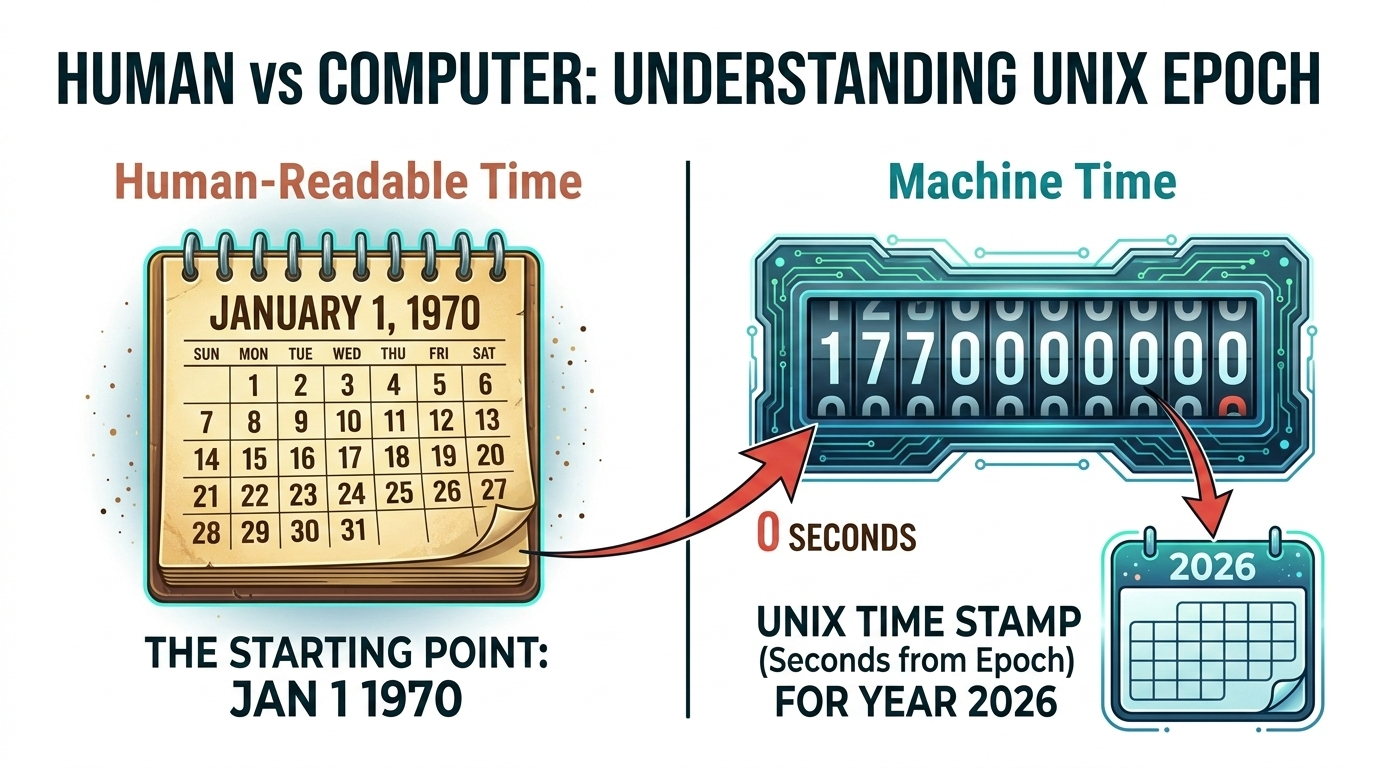
Unix Epoch Time describes points in time as the total number of seconds elapsed since 00:00:00 UTC on January 1, 1970. Unlike human-readable formats that require complex parsing of months, leap years, and timezone rules, Unix timestamps are simple integers (e.g., 1772458593).
This makes them exceptionally efficient for:
- Database indexing — integer comparisons are the fastest operation a CPU performs.
- High-frequency trading — thousands of transactions per second logged in precise order.
- Distributed systems — servers across continents agreeing on a single integer without timezone conversion.
- Mathematical calculations — subtracting two timestamps gives elapsed seconds directly.
While a human sees “March 2, 2026,” a computer processes the integer value to determine the exact millisecond an event occurred.
Timestamp vs. Time Stamping: Data vs. Proof
The distinction between a “timestamp” (the data) and “time stamping” (the process) is critical in legal and security contexts.
| Feature | Timestamp | Time Stamping |
|---|---|---|
| Nature | Data / metadata | Cryptographic process |
| Authority | Local system clock | Timestamping Authority (TSA) |
| Standard | ISO 8601 / Unix Epoch | RFC 3161 |
| Security | Easily editable | Immutable / cryptographic |
| Legal standing | None by default | Non-repudiation under eIDAS |
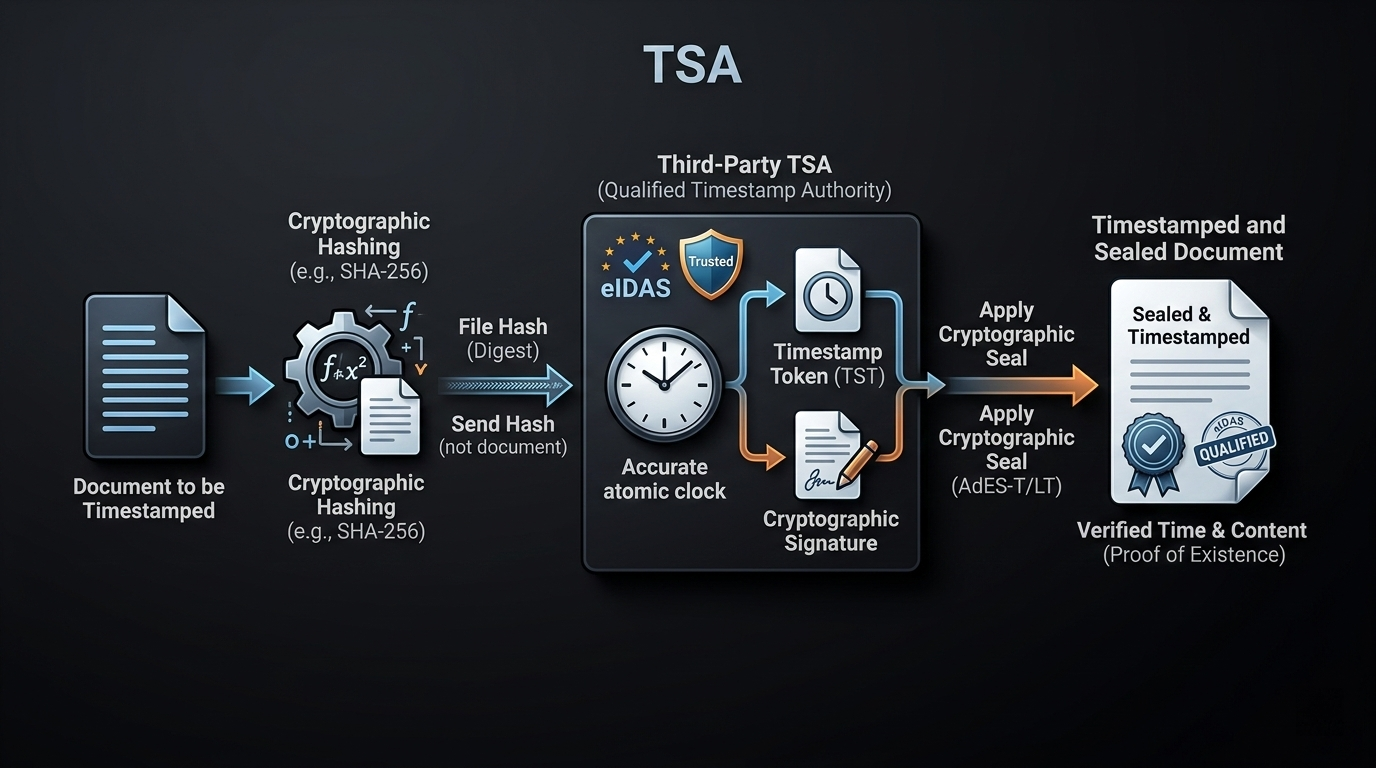
For high-stakes legal and financial documents, the industry relies on RFC 3161 protocols. According to Tecalis, professional time-stamping services use a 256-bit hash algorithm to ensure immutability. This creates a digital seal proving a document existed in a specific state at a specific time — and has not been altered since.
eIDAS: When Timestamps Become Legally Binding
In the European Union and many international jurisdictions, the eIDAS Regulation provides the legal framework for trust services. An electronic signature alone may prove who signed a document, but a Qualified Timestamp is required to prove when the signature was applied.
Under eIDAS, a Qualified Timestamp must be:
- Issued by a certified Timestamping Authority (TSA)
- Synchronized with UTC
- Cryptographically bound to the signed document
- Immutable — cannot be altered retroactively
Blockchain technology is increasingly being explored as a decentralized alternative for immutable timestamp logging, offering a transparent ledger where timestamps cannot be retroactively altered by any single entity.
Dirty Data: When Clocks Lie
“Dirty data” occurs when timestamps are out of sync due to misconfigured system clocks, hardware clock drift, or incorrect timezone offsets. In complex data pipelines, this can corrupt the entire sequence of events.
Best practices for clean timestamps:
- Normalize all records to UTC before storage — no exceptions.
- Use NTP to keep system clocks synchronized with atomic time sources.
- Audit regularly — check for timestamps that fall outside expected windows.
- Use POSIX stat calls (atime, mtime, ctime) for file-level metadata tracking. According to Wikipedia, these provide the three temporal dimensions needed for backup software and security auditing.
FAQ
Is “timestamp” written as one word or two words?
In technical, computing, and data science contexts, timestamp (one word) is the industry standard. “Time stamp” (two words) is traditionally used for physical rubber stamps. Modern style guides and dictionaries prefer the compound form for all digital records and metadata.
What is the difference between a simple timestamp and a qualified timestamp?
A simple timestamp is a local record — like the “date modified” field on a file — which can be easily altered. A qualified timestamp is issued by a verified Timestamping Authority (TSA) under regulations like eIDAS, providing cryptographic immutability and legal non-repudiation.
Why are timestamps critical for blockchain and electronic signatures?
Timestamps provide the chronological ordering for data blocks in a blockchain, preventing double-spending and ensuring ledger integrity. For electronic signatures, they provide irrefutable proof of when a contract was executed, preventing backdating or post-facto tampering.
Conclusion
Timestamps have evolved from simple file markers to complex cryptographic proofs regulated by international standards. They are the backbone of digital integrity — providing a universal “when” to every “what.”
For developers and organizations, the operational playbook is clear: normalize all records to UTC, use ISO 8601 for serialization, and engage a Trusted Timestamping Authority (TSA) when legal non-repudiation is required. Implementing these standards now prevents data synchronization failures and legal challenges later.